
Open the matter.
The drafts are already waiting.
When a document arrives or a matter opens, Sapphire Legal gets to work — so the chronology, the brief and the client prep are drafted and exportable before you sit down. It can read the whole file because the whole file lives in your own isolated environment, and nothing in it is ever used to train a model. And where something is missing, it says so on the page instead of inventing it.
Firms in the Sapphire Legal community
- Quick answer
- What is Sapphire Legal?
- Sapphire Legal is a Private Legal Intelligence platform that does the first pass of legal work before an attorney asks for it. When a document arrives or a matter opens, it drafts what that matter needs — a medical chronology, a pre-hearing brief, a client prep packet, a contract from the firm's own template — and has it waiting, exportable to Word, when the attorney opens the file. Where something is missing it names the gap rather than filling it, and a document built from unverified work says so on its first page. It can work across the whole file because the whole file lives in the firm's own per-tenant environment, with a private AI running inside Sapphire Legal's AWS account — never used to train a model, never pooled with another firm's data. It is built for solo attorneys and small law firms, and the same infrastructure also runs fractional GCs serving several client companies, larger focused firms, and regulated organizations.
Bolt-on AI waits to be asked. Ours doesn't have to.
Every incumbent legal AI is bolt-on: shared infrastructure, pooled client data, and it only runs when you remember to prompt it. Because Sapphire Legal runs inside your own private data environment, it can safely act the instant work arrives — classifying documents, surfacing briefs, flagging risk. We call it Ambient Intelligence.
A document uploads
A matter opens
A contract lands
The trigger is the event, not the user action.
Running a practice wasn't supposed to feel like tab chaos.
Solo or small firm, most practices hit the same wall: the software was assembled one tool at a time. So you juggle a practice-management login, Google Drive folders, a chatbot that doesn’t know your matters, a separate e-sign subscription, and sticky notes reminding you which client hates unlimited liability.
One view. One brain. Every matter, always loaded.
The home screen you've been wanting for years. Every client and matter — urgency, deadlines, documents, and activity — in one place, with the full context pre-loaded before you click in.
One private platform. However you practice law.
Solo attorney, focused firm, fractional GC managing a portfolio, or a regulated practice that isn't a law firm at all — same private infrastructure, same one-login context, tuned to how you actually work.
Solo
One lawyer. One practice. One price.
Private AI + research + e-sign + billing + CRM. Everything a solo firm needs, nothing it doesn't. $449/month all-in.
Built for solo attorneysFirm
One platform. Your practice type. Your workflow.
Litigation and franchise. Purpose-built for focused law firms, deployed per location at $2,500–$4,000.
Built for law firmsFractional GC
One GC. Ten clients. Zero tab chaos.
The Portfolio Command Center, House Style per client, all 14 practice areas, and AI that drafts in each client's voice. $499/mo with your first 3 client firms included.
Built for fractional GCsRegulated
Legal workflows. Not a law firm.
Fiduciary firms, trust centers, regulated orgs. Statutory deadlines, court-ready accountings, audit-defensible records. Quote-based.
Built for regulated practicesYour practice, watched over.
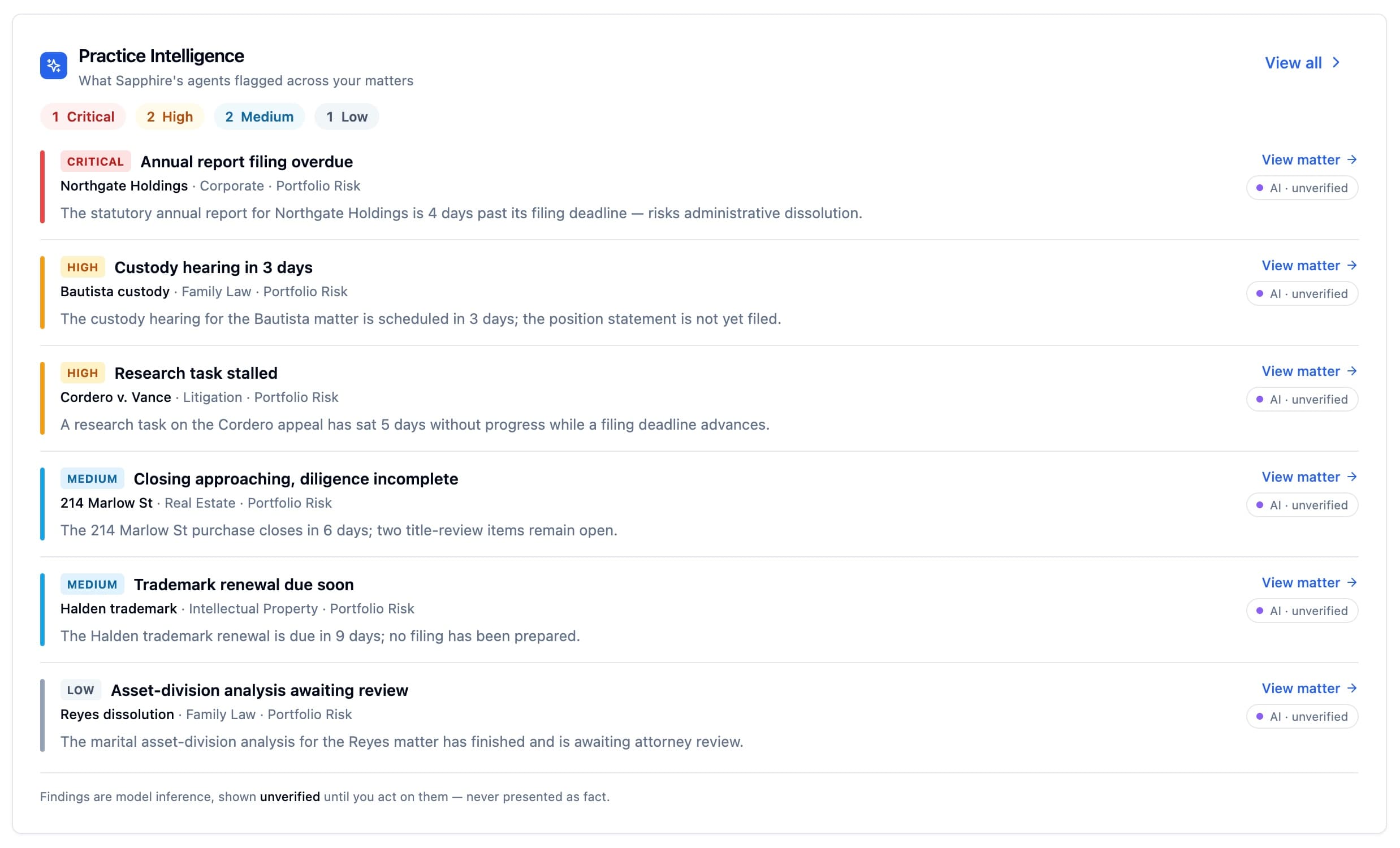
Agents run continuously across every active matter and surface their findings as severity-banded decisions — Critical to Low — without anyone asking. It opens the task, raises the escalation, posts the dashboard alert. Not a chatbot you have to prompt: a governed operating layer we call Practice Intelligence. Every finding is shown, never asserted. You decide what's real.
- Agents run continuously across every active matter — no prompt, no invocation
- Findings are severity-ranked, Critical → Low, so the urgent rises first
- Decisions surface to your dashboard automatically as tasks, escalations, and alerts
- Every finding is marked “AI · unverified” — shown for review, never presented as fact
- Covers 14 practice packs, from SSD / Disability to Corporate to Fiduciary
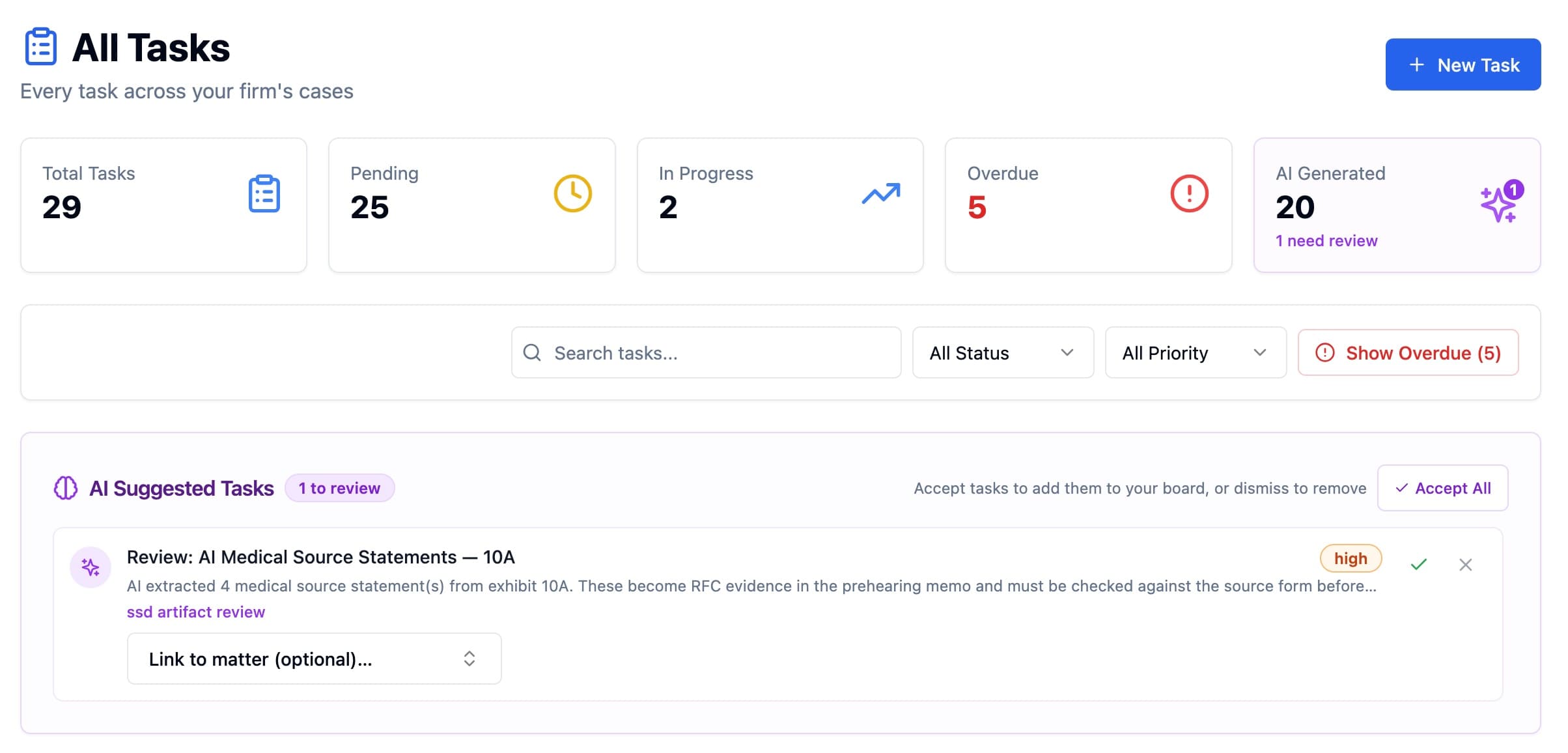
Findings become tasks — before you ask
When an agent flags something that needs doing, Practice Intelligence drafts the task and drops it in the review queue. You accept, dismiss, or link it to a matter. Nothing lands on your board without a decision.
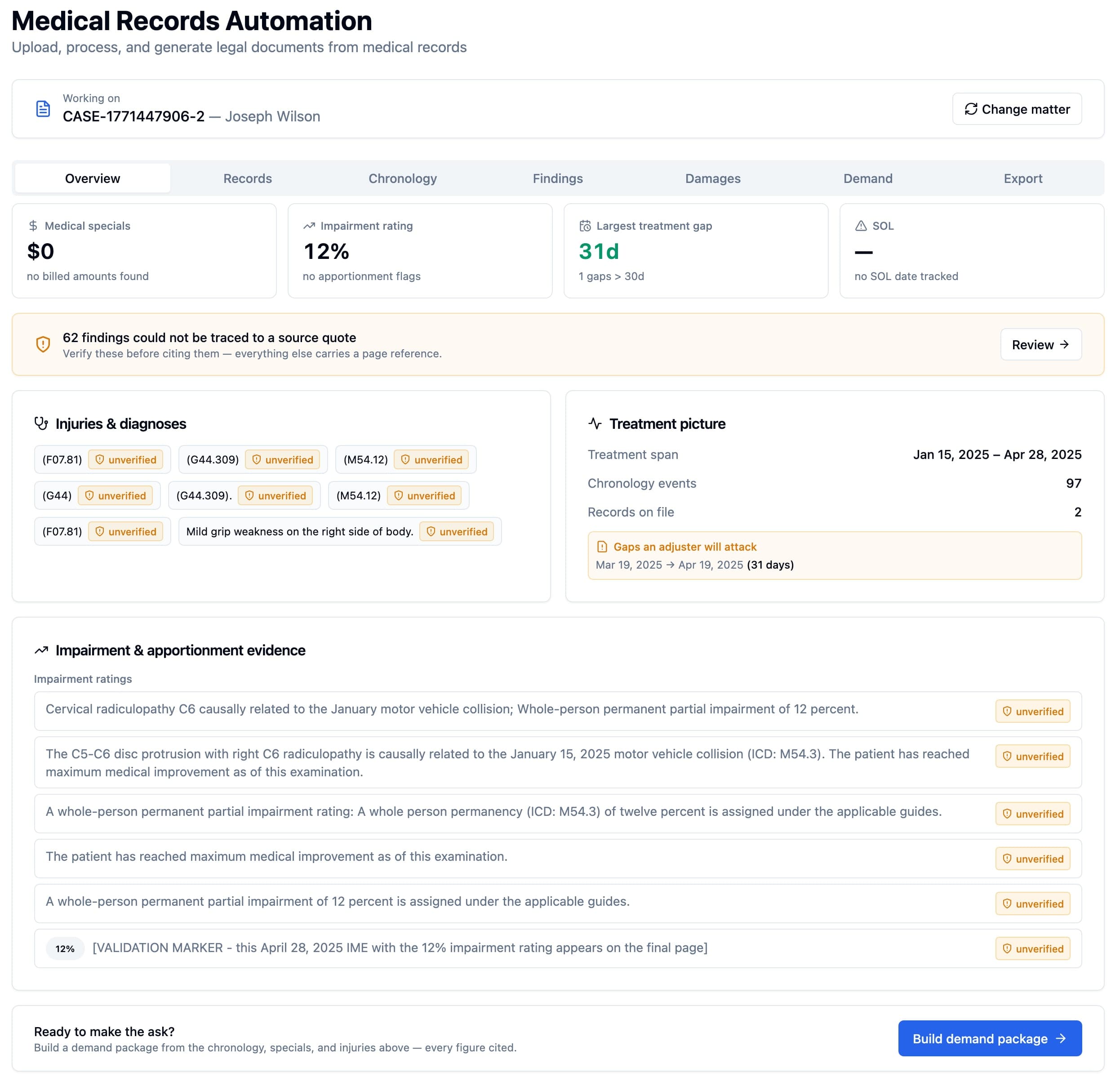
From flagged finding to cited work product
A Medium finding on a personal-injury matter isn't a dead end — it's the start of a demand package. Practice Intelligence surfaces the impairment rating, the treatment gaps an adjuster will attack, and every diagnosis, each held as unverified until you trace it to its source quote. Every figure carries a page reference before you make the ask.
Where a finding can be verified, it's traced to the source.
SSD / Disability is the flagship pack. Exhibit Intelligence reads the entire certified file and indexes every finding — and where the record backs it up, each one carries a citation you can open to the exact source quote. The rest stay unverified until you say otherwise. Nothing is asserted; everything is auditable.
Diagnosed with other spondylosis in cervical region (M47.892).
“Dx : M47.892- Other spondylosis, cervical region;”
Every citation opens to the verbatim text it came from, down to the page and exhibit. This is the difference between an AI that summarizes and one you can put in front of an ALJ — epistemic integrity, made visual.
It works before you ask. And when you do ask, it shows its work.
Ask about any matter, deadline, document or hour on the clock. Every answer shows its source, and the next step arrives ready for your approval.
- Every statement links to the record it rests on
- Already scoped to the matter you’re on
- Drafts tasks, deadlines and documents — nothing saved until you approve
See every client. In one place. For the first time.
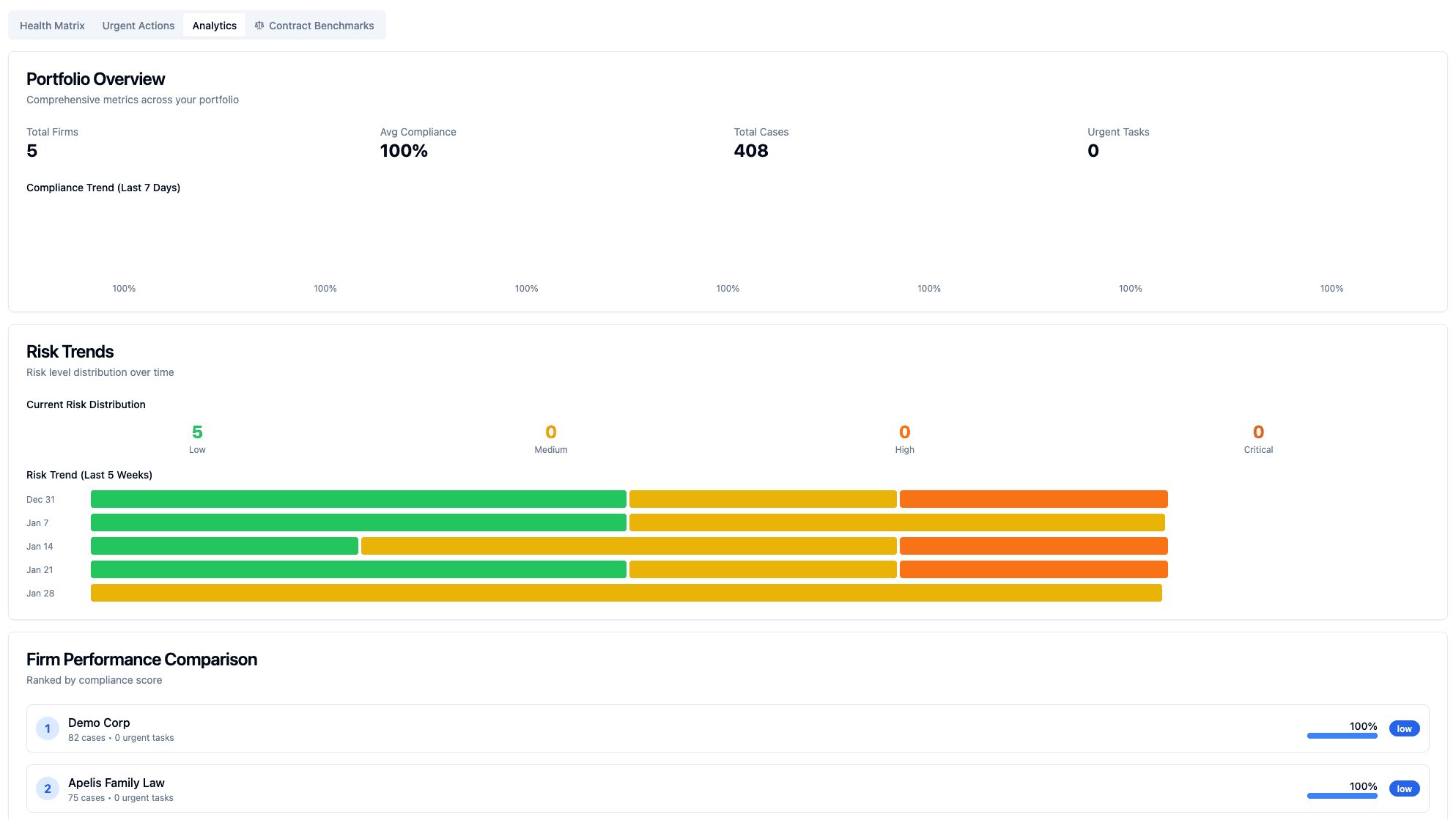
Serving several client companies at once is a different job from running one firm's caseload. A fractional GC needs portfolio-level visibility — per-client health, compliance scores, urgent actions, and active cases — without a single manual refresh.
- Per-client health matrix with compliance scores
- Urgent actions feed rolled up across every client
- Matter Kanban board with per-practice stages
- Pinned matters for the 3–5 you touch every day
- Recently viewed list for instant context recovery
Institutional memory, as code.
Everything connects. Every feature reinforces the next. This is what happens when you own the entire stack instead of stitching vendors together.
House Style
Encode negotiation posture, hot buttons, preferred positions, non-negotiables, and approved language per client. The AI enforces them on every draft. Forever.
AI that drafts in voice
Our legal AI is grounded in 12 million legal cases — not blog posts. Combined with your client's House Style, every draft comes out in their voice on the first try.
Drafting without friction
Use your template library when you have one — full support for reusable templates, field auto-population, and favorites. And when you don't have a template handy, write a plain-English prompt instead. The system classifies the document type, picks the right formatting (margins, fonts, spacing, section headings, signature blocks), and the AI fills the prose. Either path, professional output.
Document Playbooks
One-click playbooks that run a full review, draft, or extraction over a single document — MSA review, DPA drafting, credit agreement review, and more — organized by practice area, ready on day one.
Workflow context
Click “Draft” from a client page and the context flows through everything: House Style injected, RAG scoped to their prior docs, generated document auto-linked back.
Smart Collections
Documents organize themselves by tags, type, jurisdiction, or content rules. Upload a new California NDA and it appears in “CA Employment” instantly. Zero manual filing.
Sapphire Clarity
Upload a client call recording and get a structured legal intelligence report — action items, legal risk flags, sentiment, a searchable transcript, and a cross-reference against the case file. Purpose-built for legal, privilege-aware, and analysis-grade — not a Gong rewrite.
14 practice areas
Sapphire isn't generic. EMR analysis for personal injury. Asset and liability ledgers for fiduciary. Closing binders for real estate. Debt prioritization for bankruptcy. 14 practice areas, each with workflows built for the way that practice actually works.
Instant portal provisioning
3 minutes from signature to a live, branded client portal. Not 3 days. Not a ticket. Magic link in their inbox, portal loads already configured.
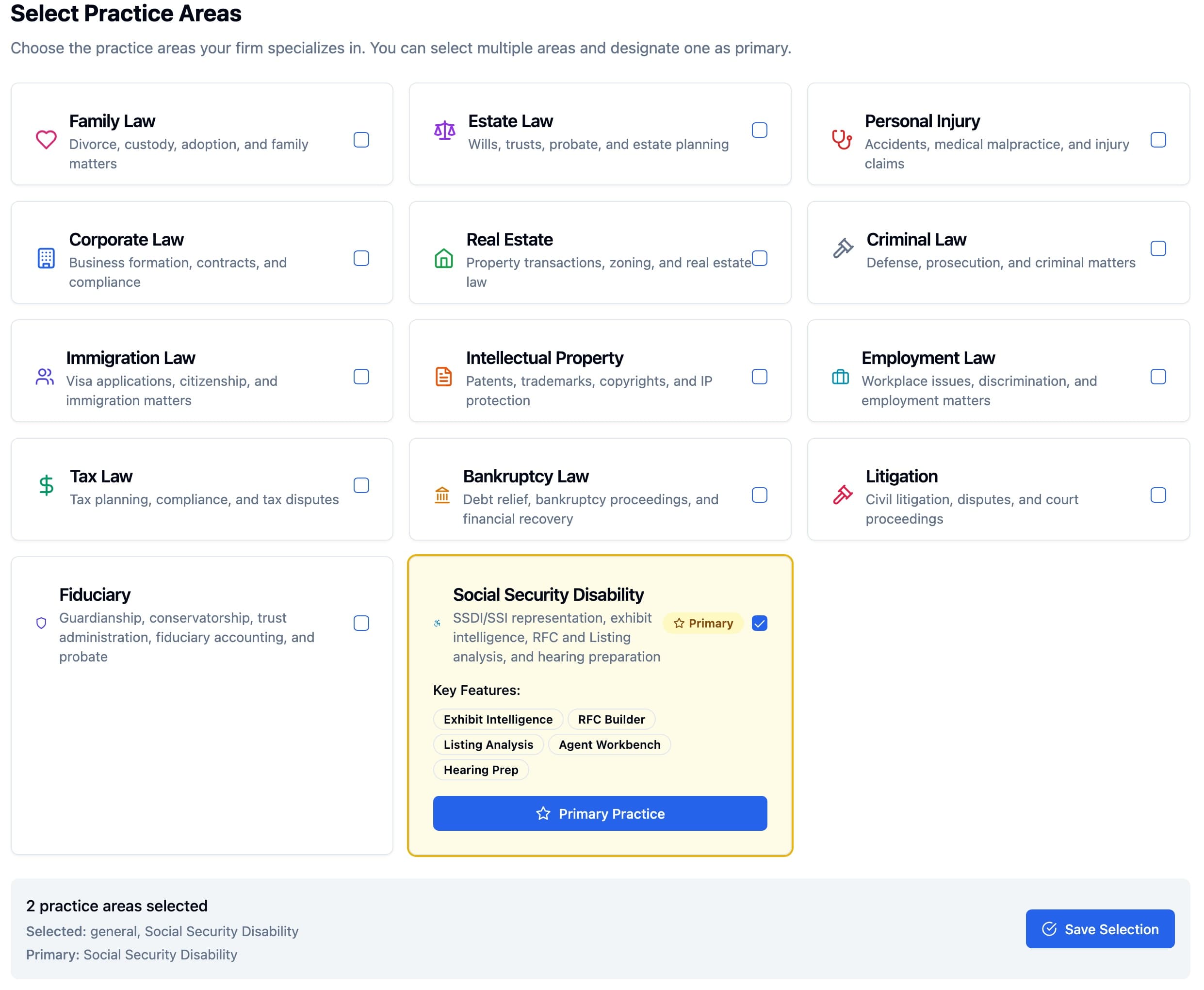
14 practice areas, each with its own workflows and intelligence
Pick the areas your firm runs and designate a primary. Each pack ships its own purpose-built tools — Social Security Disability alone adds Exhibit Intelligence, an RFC Builder, Listing Analysis, an Agent Workbench, and Hearing Prep.
Upload a call recording. Get this back.
Drop a witness interview, client intake, or deposition into Clarity and it comes back as structured legal intelligence — a per-moment engagement profile and a list of legal risk flags you can triage and resolve. Not a rebranded sales-call tool. Built for the way lawyers actually review calls.
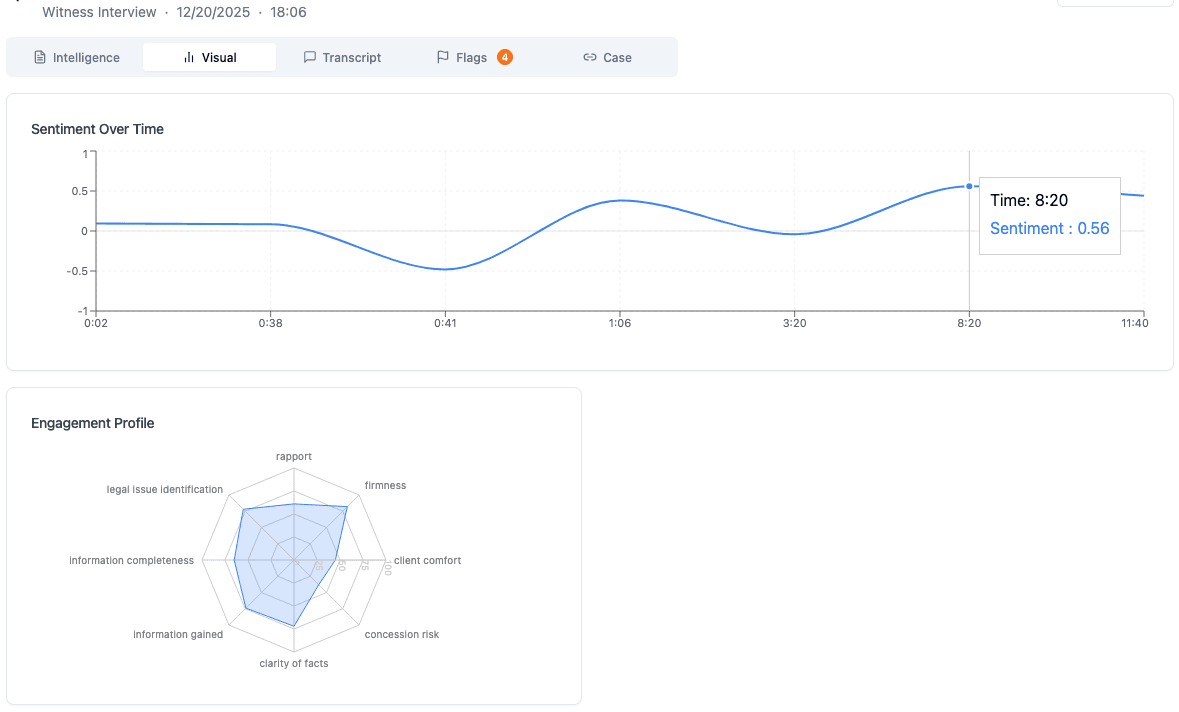
Engagement profile + sentiment over time
Every uploaded call gets an 8-axis engagement profile. Rapport. Firmness. Concession risk. Legal issue identification. Purpose-built legal metrics, not repurposed sales ones. Plus a sentiment curve so you can see when things shifted.
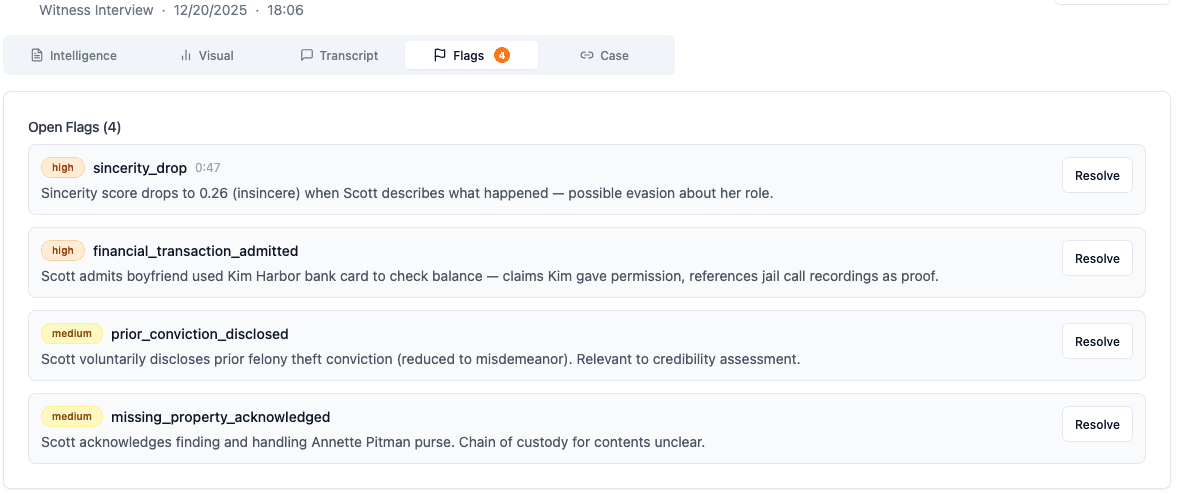
Legal risk flags, severity-ranked and timestamped
Sincerity drops. Financial admissions. Chain-of-custody issues. Credibility signals. Each flag is linked to the exact moment in the transcript and can be resolved or escalated. Privilege-aware and audit-logged.
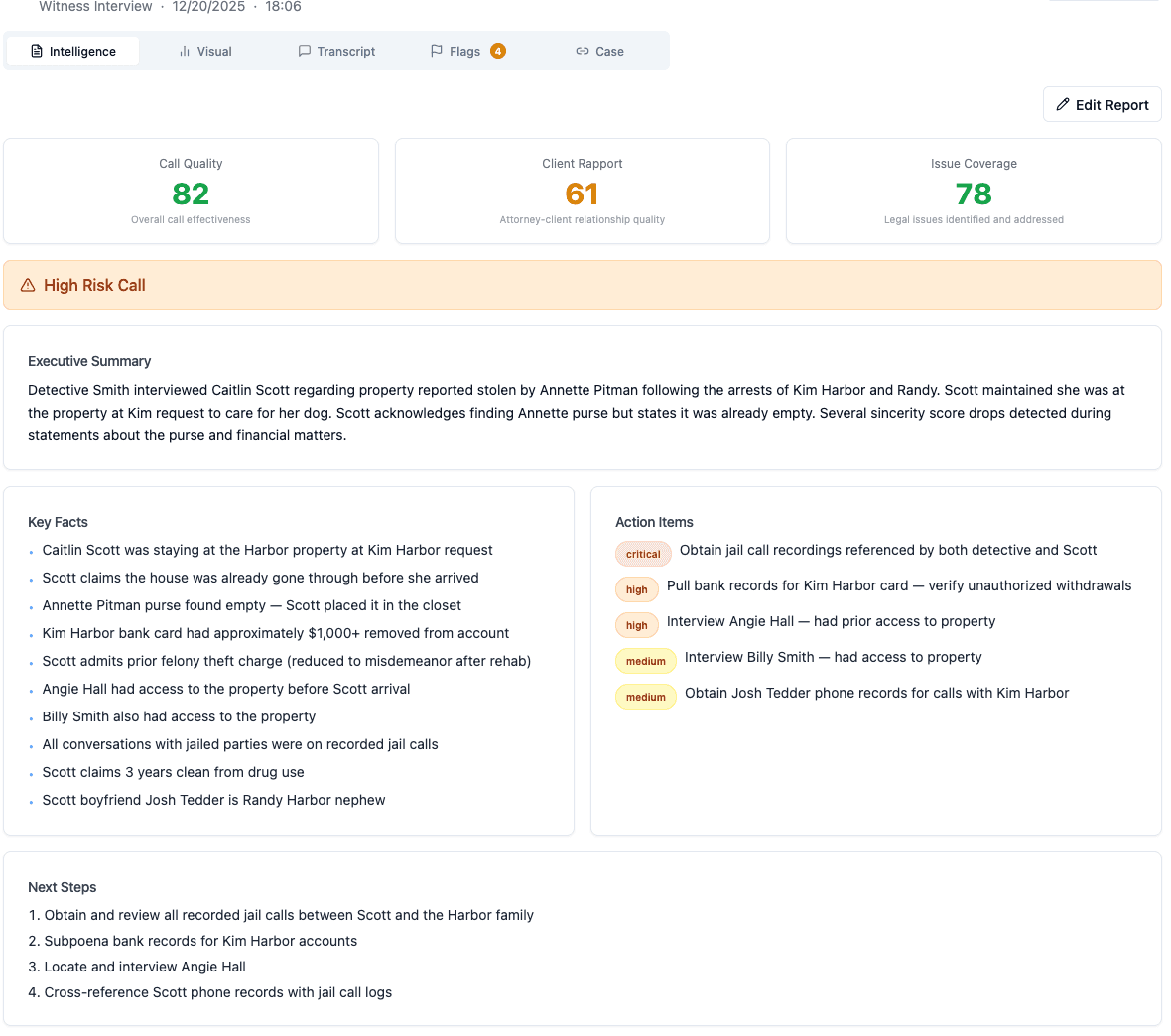
One pane of glass: summary, key facts, action items, next steps
The engagement profile and the flags aren't the whole story. Clarity also writes the executive summary, extracts the facts that matter, ranks the action items by severity, and lays out what happens next — so the uploaded recording becomes the only file you need to read before your next move.
The workflow that gives you 15 hours back every month.
Notice what you never do: load context, file a document, or remember to run a check. The platform does it because the event happened — that's what we mean by Ambient Intelligence.
Open Acme Corp from your command center
You see compliance score, active cases, upcoming deadlines, and the last 5 activities. No tab switching. No hunting for notes.
Click "Draft Document" — the AI already knows who you are drafting for
A context chip appears: 'Drafting for Acme Corp'. The House Style is auto-loaded — Delaware law, aggressive posture, no unlimited liability. The RAG is scoped to Acme's prior contracts first.
Type "draft a mutual NDA"
The AI generates an NDA in Acme's voice. Parties consistent with their prior filings. Governing law set to Delaware. Liability capped at 12 months fees. First draft is 90% there.
Click Save to Documents
The document auto-links to Acme Corp. Auto-tagged 'nda, mutual, draft'. Auto-appears in Smart Collections: 'Acme Contracts 2025', 'All NDAs', 'Delaware Agreements'. Zero manual filing.
Send for signature — status updates automatically
When Acme signs, the case status updates. Notification fires. Timeline event recorded. If this was a new client onboarding flow, their portal is already provisioned.
The whole workflow is 30 seconds. The same work in Clio + Google Docs + spreadsheets is 15 minutes.
Repeat that across a six-client portfolio, every day, and the documented 10% of billable time comes back.
The $63,000 question isn't just for fractional GCs.
Our founding client documented a 10% billable-time recovery — about 15 hours a month for a typical practice. At $350/hour, that's $63,000 a year in recovered capacity.
Data sovereignty isn't a feature. It's the foundation.
Whether it's one client's matter or a portfolio of clients who compete with each other, the data cannot mingle. Sapphire Legal is built on per-tenant database isolation, a private AI that runs inside our own AWS account, and client data that is never pooled between firms or used to train a model.
Working before you ask isn't a feature. It's the architecture.
The platform is always running, always contextual, never waiting to be asked — because it lives inside your private data environment, not behind a prompt box. That's Ambient Intelligence.
Bring your practice with you.
Your matters, contacts, and documents come across from Clio or MyCase. Nothing gets retyped.
From Clio or MyCase
Direct import: your matters, contacts, and documents arrive in your new workspace, already linked to each other.
On another platform?
Tell us which one and we'll build the importer as part of onboarding — send us an export and we take it from there.
Your data stays yours
Export everything, any time. No migration fees, no lock-in clauses — the door you came in through stays open.
See it in 30 minutes.
A live walkthrough with your actual client scenarios. You pick a slot on the next screen — no back-and-forth.